

Hotel Lobby AI Video Generator

Turn two photos into your own orange-booth rap video. Pick your duo, video length and quality, then create and download.

Set up your rap duo

Choose your duo
Checking photo...
Checking photo...

JPG, PNG or WebP, up to 8 MB each

Cost: 50 paid credits

One free trial: 5s at 768P. Other options use paid credits.

Your credits

Buy credits

Checking your credits…

Photo selection saves a local draft. Upload starts when you generate.

Video preview

Real 5s example

What Is Hotel Lobby AI?

Hotel Lobby AI is a rap-duo video format inspired by Quavo and Takeoff’s HOTEL LOBBY performance on A COLORS SHOW. Its recognizable ingredients are a vivid orange room, two performers and one suspended microphone. The name comes from the song, rather than a hotel interior. Creators reinterpret the setup with new pairs of people, characters and sometimes pets.

There are two common ways to make the effect. One edits an existing performance and replaces the subjects; the other generates a new orange-booth scene from reference images. These workflows can differ in motion, audio and how closely they follow the original. Read the trend guide for the background, a reusable prompt and a fuller comparison of the two approaches.

Read the origin, tutorial & prompts

Hotel Lobby AI Video Examples

Explore Hotel Lobby AI video examples with two people, a person and a pet, or two pets. Switch between 5-second and 10-second clips to see each pairing in the signature orange booth with one hanging microphone.

Original synthetic portrait used for the male performerLeft performer
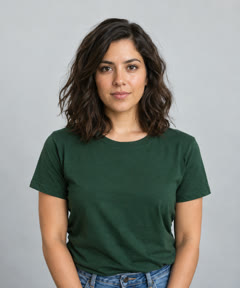
Original synthetic portrait used for the female performerRight performer
Real 5-second example made from the two photos below, with a fixed soundtrack.

Two people, one orange booth

Turn separate photos of friends, a couple or your favorite duo into a Hotel Lobby AI video. Keep each face clear and choose who goes on the left. A 5-second clip gives the left performer the lead while the right grooves along; a 10-second video gives both performers a turn. These examples use the same two original portraits, so you can compare the shorter and longer performances.

Create video

How to Make a Hotel Lobby AI Video

Upload two photos, arrange your performers and choose your options. Click Generate video to create your orange-booth performance, then play and download the result.

Choose two clear photos

Use one image for each performer. Start with faces you can recognize at a glance, even lighting and enough detail to see the eyes and mouth. You can replace either reference independently, so keep a good photo while you improve the other one. The upload controls check file type, size and image dimensions.

Arrange your performers

Choose your duo, frame shape, video length and quality before reviewing. Both subjects share one suspended microphone. Check the credit cost and your balance before submitting.

Generate, watch and download

Click Generate video to submit your photos and start the task. Progress appears beside the form. Once complete, play the finished video and download it; your saved videos are also available in your history.

How to Prepare Photos for a Hotel Lobby AI Video

Plan your two-person, person-and-pet or two-pet rap video in one place: choose clear reference photos, arrange the duo, then review the format, credits and soundtrack.

One clear subject in each photo

Use two separate JPG, PNG or WebP photos, up to 8 MB each. Keep the eyes and mouth visible; for pets, show the face and natural posture. Avoid crowded group photos, masks and heavy filters.

Good lighting and recognizable detail

Choose sharp photos with even light and enough detail around the face. Avoid motion blur, deep shadows and overexposure. The two backgrounds can differ; clear subjects matter more than matching scenery.

Check left and right, then save your draft

Review both previews and swap or replace a photo if needed. Your draft stays in this browser until you clear it; photos are uploaded only when you confirm an available generation request. Clear the draft on shared devices.

Review video options, credits and audio

Choose 5 or 10 seconds, portrait or landscape, and your quality level. Paid generation uses 40–200 credits; the trial covers one 5-second 768P video. Each duration has a fixed soundtrack; the original song is not included.

Hotel Lobby AI Video FAQs

Read the origin, tutorial & prompts

Ready to Set Up Your Rap Duo?

Choose two photos and make the first creative decisions now. Check the faces, try the left and right arrangement, and save a draft you can return to while you plan your orange-booth video.

Create video